AI agents are quickly changing how we think about enterprise digital experiences.
Traditional AI assistants were primarily designed to answer questions. Give them a prompt, provide some context, and they generate a response. AI agents take this further. They can reason about a user’s intent, identify what information or capabilities they need, interact with external systems, and potentially take actions on the user’s behalf.
But this creates an important enterprise challenge.
An AI agent may be intelligent, but intelligence alone does not give it access to the information and capabilities required to complete a business task.
Consider an employee asking:
“Find our parental leave policy, tell me what I am eligible for, and help me start the appropriate HR request.”
Answering this request could require access to multiple enterprise capabilities. The agent may need to retrieve the latest HR policy, understand information about the employee, identify the appropriate business process, create a request, and perhaps initiate a workflow in another enterprise system.
Historically, connecting AI applications to these capabilities would require building and maintaining custom integrations for each system.
This is where Model Context Protocol (MCP) becomes particularly interesting.
And for organizations already using Liferay DXP as the digital layer connecting users, content, applications and enterprise systems, MCP opens up an important new architectural possibility.
Instead of Liferay serving only as the digital experience through which people interact with enterprise services, it can increasingly become a platform through which AI agents discover and interact with enterprise capabilities as well.
What Is MCP — Without the Protocol Jargon?
Model Context Protocol, or MCP, provides a standardized way for AI applications to connect with external information and capabilities.
The easiest way to understand MCP is to think of it as a standardized doorway between an AI agent and the systems it needs to work with.
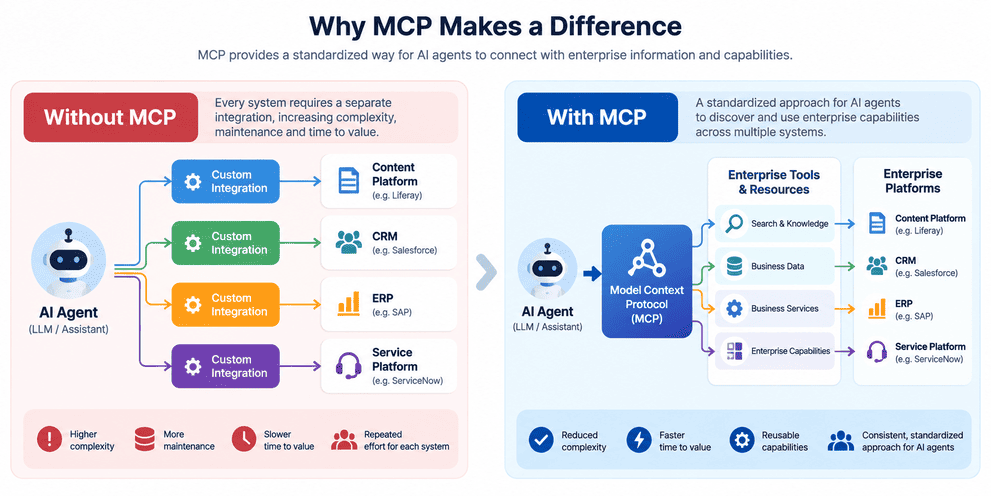
Without a common approach, an AI application may require a separate integration for every system it needs to access.
An agent connecting to a content platform may require one integration.
Connecting to a CRM may require another.
Connecting to an ERP, service management platform or internal application may require another.
As organizations introduce more AI applications and agents, this quickly creates another integration challenge.
MCP introduces a common model through which systems can expose capabilities that AI applications can discover and use.
At a high level, an MCP server can expose concepts such as tools, resources and prompts. An AI application or agent can discover the available capabilities and determine which ones are relevant to the task it is trying to complete.
For example, an enterprise platform might expose capabilities that allow an agent to:
- search knowledge
- retrieve customer information
- look up an order
- create a service request
- update structured business information
- trigger an approved business operation
MCP does not eliminate APIs, integration platforms or enterprise services.
Those capabilities still need to exist.
Instead, MCP provides a standardized AI-facing layer through which agents can discover and interact with them.
Where Does Liferay DXP Fit?
This is where MCP becomes especially relevant for organizations using Liferay.
Liferay DXP already occupies an important architectural position in many enterprises.
It can provide digital experiences for customers, employees, suppliers, partners and other audiences while connecting those experiences with enterprise applications and information.
A typical architecture may already look something like this:
User → Liferay DXP → Enterprise Systems
Behind Liferay could be CRM platforms, ERP systems, service management platforms, identity providers, custom applications, knowledge repositories and other enterprise services.
With MCP, another interaction model becomes possible:
User → AI Agent → MCP → Liferay DXP → Enterprise Capabilities
Recent versions of Liferay DXP can operate as an MCP server, allowing compatible AI applications to discover and interact with capabilities exposed by the platform.
This is significant because organizations do not necessarily need to think about AI agents as an entirely separate experience architecture.
Liferay can continue to provide the enterprise experience and integration layer while also making selected capabilities accessible to AI-driven experiences.
The portal therefore becomes more than the interface a human sees.
It can become part of the enterprise capability layer that an AI agent can interact with.
What Could an AI Agent Access Through Liferay?
The value becomes clearer when we look at the types of capabilities Liferay already manages.
Enterprise Content and Knowledge
Most enterprise portals contain significant amounts of useful organizational knowledge.
This could include:
- policies and procedures
- knowledge articles
- FAQs
- product information
- support documentation
- employee resources
- supplier documentation
- structured web content
Today, users often navigate through pages, menus and search results to locate this information.
An AI-driven experience changes the interaction.
Instead of navigating through the portal, an employee might simply ask:
“What is our current travel reimbursement policy for international travel?”
An agent could identify the appropriate content source, retrieve the relevant information and provide the answer within the context of the conversation.
The content continues to be managed through Liferay. What changes is how the user discovers and consumes it.
Liferay Objects and Business Data
Liferay Objects make the scenario even more interesting.
Organizations increasingly use Objects to represent structured business information and lightweight applications within Liferay.
Examples might include:
- service requests
- supplier registrations
- applications
- product records
- support cases
- employee requests
- partner opportunities
An agent could potentially interact with these business entities instead of simply retrieving content.
A customer could ask:
“Show me my open service requests.”
A supplier could say:
“Create a request to update our banking information.”
A partner could ask:
“What is the status of the opportunity I registered last week?”
This moves the experience from conversational search toward conversational business operations.
APIs and Enterprise Services
Liferay’s headless APIs and integration capabilities remain an important part of this architecture.
MCP should not be viewed as a replacement for APIs.
Instead, the two can complement each other.
An agent may discover that a particular capability is available through MCP. Behind that capability, Liferay may use an API or enterprise service to perform the actual business operation.
Conceptually:
AI Agent → MCP → Liferay Capability → API / Service → Business System
This separation is important.
The AI agent does not need to understand every implementation detail of the underlying enterprise architecture. It needs to understand what capability is available, when it should use it and what information is required to invoke it.
Existing Enterprise Integrations
This is potentially where the architecture becomes most valuable.
Many Liferay implementations already integrate with platforms such as:
Salesforce, SAP, ServiceNow, ERP systems, HR platforms and custom enterprise applications.
Organizations have often invested years building these integrations.
MCP creates the possibility of making selected capabilities from this existing ecosystem accessible to agents without treating every AI use case as an entirely new integration landscape.
Liferay can therefore become a bridge between agentic experiences and existing enterprise investments.
From “Answer My Question” to “Complete My Task”
The real value of AI agents becomes visible when we move beyond information retrieval.
Consider an employee who has recently moved and tells an employee service agent:
“I’ve moved to a new address. Update my details and tell me if there are any benefits documents I need to update.”
A traditional chatbot might provide instructions:
“Navigate to Employee Services, select Personal Information, choose Change Address and complete the form.”
That is helpful, but the employee still needs to complete the process.
An agent-enabled experience could be different.
The agent could understand that the employee wants to update their address.
It could retrieve the relevant policy and determine whether changing the address affects benefits or payroll information.
It could identify the appropriate business capability for updating employee information.
It could ask the employee to confirm the new address.
Once confirmed and authorized, it could initiate the appropriate update or workflow.
Finally, it could tell the employee whether any additional action is required.
The experience moves from:
Search → Information → Instructions
to:
Intent → Reasoning → Action → Outcome
This is an important shift in how enterprise digital experiences can be designed.
An Agent-Ready Liferay Architecture
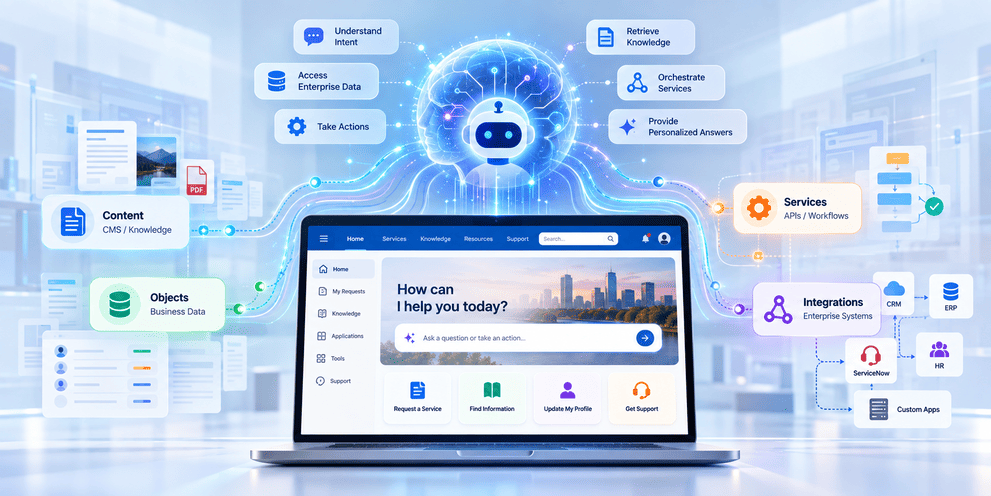
Putting these concepts together gives us a useful reference architecture.
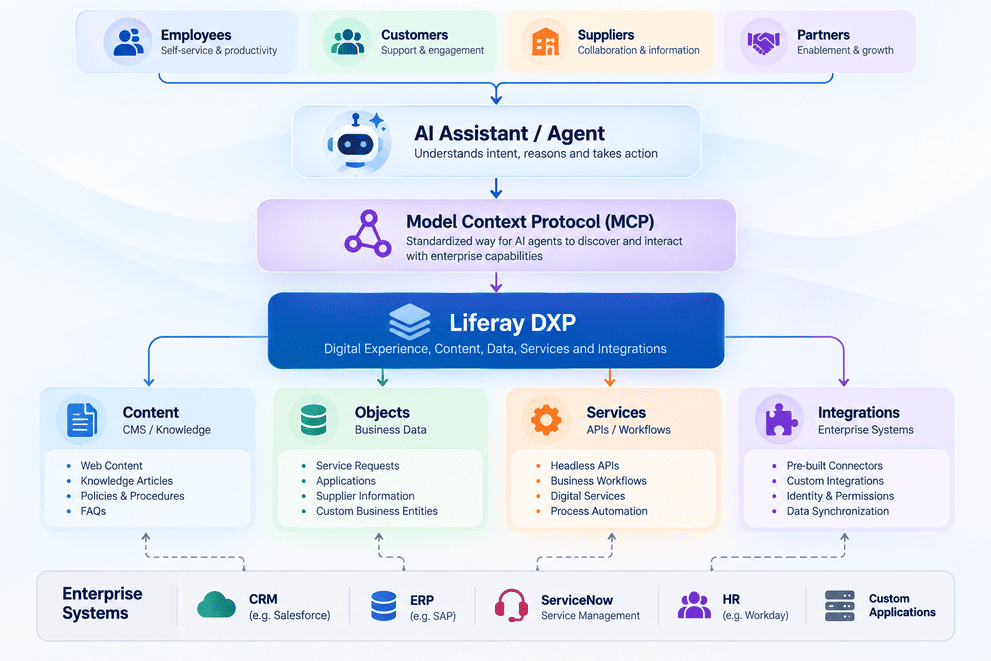
This architecture also helps clarify the responsibilities of each layer.
The AI agent provides reasoning and orchestration.
MCP provides a standardized mechanism for discovering and interacting with capabilities.
Liferay provides enterprise content, business data, services, permissions and integrations.
And the underlying enterprise systems continue to provide transactional systems of record.
Put simply:
The agent provides the intelligence. MCP provides the connection. Liferay provides the enterprise context and capabilities.
MCP Does Not Mean Unlimited AI Access
Connecting AI agents to enterprise capabilities naturally raises an important question:
How much access should an AI agent actually have?
The answer should not simply be “whatever the technology allows.”
Enterprise AI must operate within the same principles of identity, security, authorization and governance that apply to other digital channels.
The architecture therefore needs to consider:
Identity → Authentication → Authorization → Permission → Action → Audit
Not every capability exposed to an agent should have the same level of autonomy.
For example, there is a significant difference between allowing an agent to:
Read — Retrieve an HR policy.
Recommend — Identify the appropriate HR process.
Prepare — Populate an employee request and ask the user to review it.
Act — Submit or modify enterprise information on behalf of the employee.
The level of control should increase as the sensitivity and business impact of the action increases.
For high-impact operations, organizations may require explicit user confirmation, additional authorization or human approval before the agent is permitted to proceed.
The goal should not be maximum agent autonomy.
The goal should be appropriate autonomy within enterprise controls.
What Could This Look Like Across Enterprise Portals?
The same architecture can support very different digital experiences.
Customer Experience
A customer asks:
“Where is my order, and why has it been delayed?”
The agent could combine customer information available through Liferay with order and shipment information from an ERP or order management system.
Instead of providing another search interface, the experience becomes a conversation around the customer’s actual situation.
Employee Experience
An employee asks:
“My laptop needs access to the finance application. Can you submit the request?”
The agent could identify the appropriate access policy, gather the necessary information and initiate the relevant workflow or ServiceNow request.
Supplier Experience
A supplier asks:
“Which of our invoices are overdue?”
Liferay could provide the supplier experience and identity context while an integration with SAP or another ERP provides the transactional information required to answer the question.
The agent could then help the supplier understand what action is required.
Partner Experience
A partner says:
“Register this opportunity for Acme Corp.”
The agent could collect the required opportunity information, validate that mandatory fields are available and initiate the appropriate process through Liferay and the connected CRM platform.
Across all four scenarios, the underlying pattern is similar.
The user expresses an intent.
The agent determines which capabilities are required.
MCP provides a standardized mechanism for accessing those capabilities.
Liferay provides the digital context and connection to enterprise services.
MCP Is Not the AI Agent
As MCP gains attention, it is important not to confuse the protocol with the intelligence itself.
MCP does not reason about a customer’s problem.
It does not independently decide business strategy.
And it does not replace the enterprise systems where business information lives.
Each component has a different responsibility.
The LLM or AI agent provides language understanding, reasoning and orchestration.
MCP provides a standardized mechanism through which capabilities and context can be made available to that agent.
Liferay DXP provides enterprise content, structured data, digital services, security context and integrations.
Enterprise applications continue to provide systems of record and specialized business functionality.
Understanding these boundaries helps organizations design agentic architectures without unnecessarily replacing platforms and integrations that already work.
From Digital Experience Platform to Agent-Ready Experience Platform
For many years, digital experience architecture has largely assumed that the primary interaction happens through a screen.
A customer visits a portal.
An employee navigates an intranet.
A supplier signs into a supplier portal.
A partner searches a knowledge base.
The experience is designed around helping the user navigate the digital platform to reach the information or service they need.
AI agents introduce another model.
The user may no longer need to know where the information lives or which application performs a particular task.
They may simply express their intent:
“Help me resolve this invoice.”
“Change my address.”
“Find the latest product documentation.”
“Create a support request.”
The agent can then determine which enterprise capabilities are required to fulfil that intent.
This does not necessarily make the digital experience platform less important.
It can make its role broader.
Liferay can continue to provide rich web and mobile experiences for users who interact directly with the platform while also providing content, business context and enterprise capabilities to AI-driven experiences.
The architecture therefore evolves from:
Enterprise Systems → Liferay → Human
to include:
Human → AI Agent → MCP → Liferay → Enterprise Systems
The next generation of digital experiences may not always begin with a user navigating a portal.
Increasingly, they may begin with a user simply expressing what they want to accomplish.
For organizations building on Liferay DXP, preparing for that future means thinking beyond pages, navigation and search.
It means considering how enterprise content, Objects, APIs, workflows and integrations can become secure, discoverable capabilities that AI agents can use to help people get work done.
And that may be one of the most important architectural shifts as digital experience platforms move into the age of agentic AI.