Enterprise service portals have come a long way. They are more accessible, better organized, and increasingly integrated with platforms such as ServiceNow. Yet for many employees, the fundamental experience of getting help has changed surprisingly little.
When an employee encounters an IT issue, needs access to an application, wants to request new equipment, or simply has a question about an internal service, the process often looks something like this:
Search → Navigate → Select → Fill Out a Form → Submit → Wait
The employee may need to determine whether the issue is an incident or a service request, find the right category in a service catalog, select the appropriate form, provide information they may not fully understand, and then wait for the service desk to respond.
From a service-management perspective, this structure makes sense. Categories, workflows, queues, assignment groups, service catalogs, and approval processes help organizations manage thousands of requests efficiently.
But employees should not need to understand that structure just to get help.
Consider a simple scenario: an employee changes their corporate password and can no longer connect to the VPN. Their objective is straightforward — get connected again.
They shouldn’t have to determine which IT service owns the VPN, search through multiple knowledge articles, decide whether to raise an incident, find the correct category, and describe the problem using terminology that makes sense to the service desk.
They should simply be able to say:
“I changed my password and now I can’t connect to the VPN.”
The digital experience should be capable of understanding that intent and helping determine what needs to happen next.
Perhaps there is already an approved troubleshooting procedure that can resolve the issue immediately. Perhaps there is a known outage affecting multiple employees. Or perhaps the problem genuinely requires assistance from the service desk.
The employee shouldn’t have to decide which path to follow. The platform should help make that determination.
This is where AI introduces an important shift in enterprise service management.
Instead of requiring employees to navigate the organization’s service-management structure, we can begin designing experiences that understand what the employee is trying to accomplish and connect that intent with the right knowledge, data, workflow, or support team.
The opportunity is therefore not simply to build a better service portal.
It is to transform the service portal into an intelligent service experience.
From Service Portal to Intelligent Service Experience
The next evolution of enterprise service portals is not about adding more forms, more menu options, or even a better search experience. It is about changing how employees interact with enterprise services altogether.
Instead of expecting employees to understand how services are organized internally, organizations can create an experience where employees simply describe what they need and the platform helps determine the appropriate response.
This is where Liferay DXP, ServiceNow, and AI can play complementary roles.
Liferay DXP can serve as the digital experience layer — providing employees with a unified, personalized, and secure entry point to enterprise services.
ServiceNow can continue to operate as the service management platform — managing incidents, service requests, workflows, approvals, service catalogs, and the operational processes behind them.
AI can introduce an intelligent interaction layer between the employee experience and these enterprise systems. It can interpret what the employee is asking, retrieve relevant information, surface appropriate knowledge, and help determine which workflow or action should happen next.
The positioning is simple:
Liferay provides the experience. ServiceNow manages the service. AI connects user intent with enterprise knowledge and workflows.
Consider an employee asking:
“Can I get access to the project management application my team uses?”
The employee does not necessarily know the name of the ServiceNow catalog item, which access group is required, whether manager approval is necessary, or which team ultimately fulfills the request.
They should not have to.
An intelligent service experience could understand the employee’s request, identify the appropriate service, gather the information required to initiate it, explain any approval requirements, and — with the employee’s confirmation — start the appropriate ServiceNow workflow.
The same principle applies to many everyday interactions.
An employee asking “What’s happening with my laptop request?” could receive the latest status from ServiceNow.
Someone asking “How do I configure email on my new phone?” could receive an answer grounded in approved enterprise documentation.
An employee reporting “Microsoft Teams isn’t working” could first be informed about a known service disruption before another duplicate incident is created.
The underlying systems and workflows remain important. In fact, they become even more valuable because AI can make them easier for employees to access and interact with.
The goal is not to replace ServiceNow or bypass established service-management processes. It is to create a more intuitive experience on top of them.
Instead of asking:
“Where in the service portal do I need to go?”
the employee can simply ask:
“Can you help me with this?”
That shift — from navigating services to expressing intent — is what turns a traditional service portal into an intelligent service experience.
An Employee Service Journey: From Question to Resolution
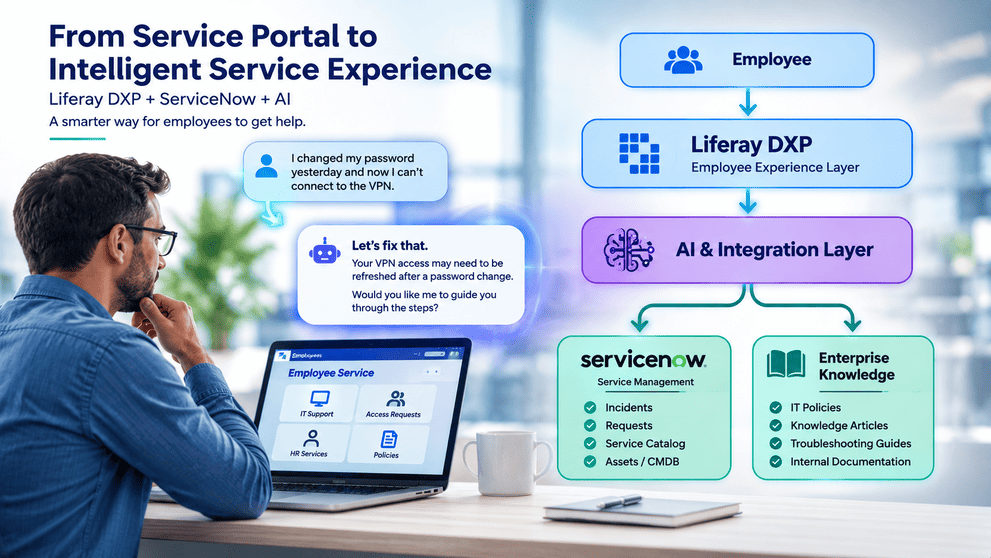
Consider a common scenario. Alex recently changed his corporate password and can no longer connect to the VPN.
Instead of searching the service portal, browsing knowledge articles, or figuring out which IT category to select, Alex simply asks:
“I changed my password and now I can’t connect to the VPN.”
The AI understands the context of the request and looks for relevant information across approved enterprise knowledge and ServiceNow. It may identify a known issue, recommend an approved troubleshooting procedure, or guide Alex through a few simple steps.
If the problem is resolved, no ticket needs to be created.
If it isn’t, Alex can ask for help and the experience can initiate the appropriate ServiceNow incident — carrying forward useful context about the problem and the troubleshooting already attempted.
Later, Alex can simply ask:
“What’s happening with my VPN issue?”
and receive the latest status from ServiceNow through the same Liferay experience.
The journey becomes:
Ask → Understand → Resolve → Escalate → Track
The service-management processes still happen behind the scenes. The difference is that Alex no longer needs to understand or navigate them himself.
Behind the Experience: Liferay + ServiceNow + AI
Creating this kind of experience does not require replacing the enterprise platforms already doing their jobs. The opportunity comes from connecting them in a way that makes service delivery simpler for the employee.
Liferay DXP acts as the digital experience layer — providing the employee portal, authentication, personalization, content, and a consistent interface for accessing enterprise services.
ServiceNow remains the service management platform, managing incidents, service requests, workflows, approvals, service catalog information, and operational service data.
Between them, an AI and integration layer interprets employee intent and brings together the information needed to respond. Depending on the request, this could include ServiceNow data alongside enterprise knowledge such as IT policies, troubleshooting guides, FAQs, and internal documentation.
For example, when Alex reports a VPN problem, AI can use approved knowledge to recommend a resolution. If escalation is required, the integration layer can interact with ServiceNow to create the appropriate incident. When Alex later asks for an update, the same experience can retrieve the latest status.
The architecture can be represented simply as:
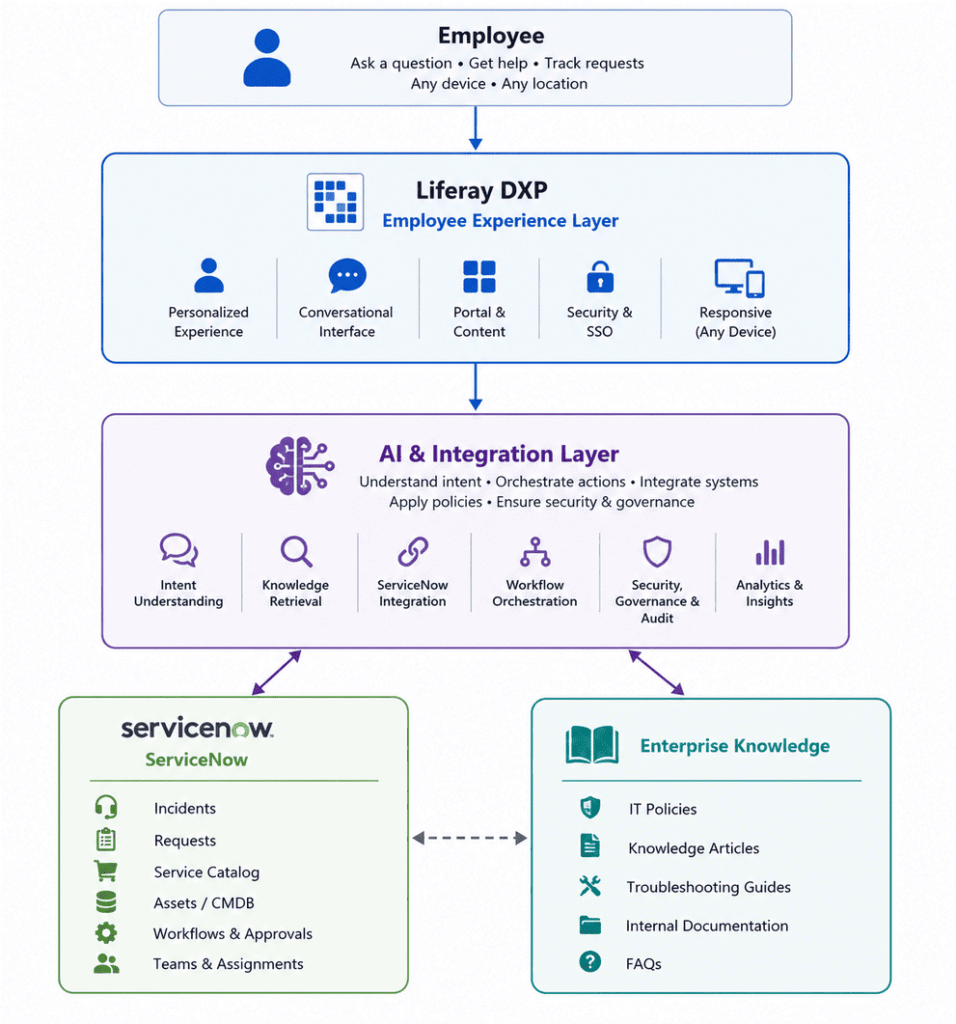
Each layer continues to do what it does best. The difference is that employees interact with the combined capabilities through one intelligent experience rather than navigating the complexity of the underlying systems.
AI Shouldn’t Just Create Tickets
Using AI to make it easier to create a ServiceNow ticket can improve the experience, but that alone is not transformation. The bigger opportunity is to determine whether a ticket needs to be created at all.
An intelligent service experience should follow a different path:
Understand → Resolve → Automate → Escalate
If an employee reports a common technical issue, AI can first surface an approved resolution. If multiple employees are affected by a known outage, it can communicate the existing issue rather than generate duplicate incidents.
For requests such as software installation or application access, AI can help identify the appropriate service, gather the required information, and initiate the relevant ServiceNow workflow. It can also collect useful diagnostic context before an issue reaches the service desk.
Only when the problem cannot be resolved or automated should escalation become the next step.
This changes the role of AI from a faster ticket-creation interface into an intelligent service layer that helps reduce repetitive requests, improves the quality of escalations, and gets employees to the right outcome faster.
Making AI-Powered Service Management Enterprise-Ready
Connecting AI with enterprise service management also introduces an important requirement: intelligence cannot come at the expense of security, governance, or control.
The experience should begin with trusted identity and SSO, ensuring that users are authenticated before accessing personalized services. Authorization should then determine which ServiceNow records, enterprise knowledge, and actions are available to each employee.
The same principle should apply to AI:
AI should operate within the same authorization boundaries as the employee using it.
An employee should not be able to retrieve an incident, document, or service information through AI that they would not otherwise be permitted to access.
Organizations should also consider API permissions, protection of sensitive data, grounding AI responses in approved enterprise knowledge, maintaining audit trails, and requiring explicit confirmation before actions such as creating or updating service requests.
And when AI cannot confidently resolve a request, there should always be a clear path to human support.
The goal is not unrestricted automation. It is trusted, governed intelligence operating within established enterprise controls.
Start Small: An AI Adoption Path for Service Management
Organizations do not need to transform their entire service management operation at once. A more practical approach is to introduce AI incrementally, starting with low-risk use cases and expanding as confidence, governance, and integration capabilities mature.
Phase 1 — AI Knowledge Assistant
Start by allowing employees to ask questions and receive answers grounded in approved knowledge articles, policies, FAQs, and troubleshooting documentation.
Phase 2 — ServiceNow-Aware Assistant
Connect the experience with ServiceNow so employees can securely retrieve information such as incident status, service requests, or relevant service information.
Phase 3 — AI-Assisted Transactions
Allow AI to help employees initiate actions — creating incidents, submitting service requests, or requesting application access — while maintaining appropriate validation and user confirmation.
Phase 4 — Intelligent Service Orchestration
Move toward an experience where AI can determine whether a request should be answered through knowledge, resolved through guided troubleshooting, routed into an automated workflow, or escalated to the appropriate service team.
The progression is deliberate:
Knowledge → Context → Action → Orchestration
Starting small allows organizations to demonstrate value early while gradually building the trust, governance, integrations, and operational maturity required for more intelligent service experiences.
From Managing Tickets to Delivering Intelligent Service
For years, enterprise service management has focused on making incidents, requests, catalogs, and workflows more efficient. AI creates an opportunity to rethink the experience from the employee’s perspective.
Employees should not need to understand service catalogs, ticket categories, assignment groups, or the systems operating behind the scenes. They should simply be able to explain what they need and receive the right response.
That does not mean replacing platforms such as ServiceNow. ServiceNow can continue to manage the structured processes, workflows, and service data that enterprises depend on.
What changes is the way employees interact with those capabilities.
Liferay DXP can provide the unified digital experience, ServiceNow can remain the system of record for service management, and AI can make the interaction between employees, enterprise knowledge, and workflows more intelligent.
The result is a shift from simply managing tickets to delivering an experience that can understand intent, resolve common issues, initiate the right processes, and escalate when human expertise is needed.
For organizations already investing in digital experience and service management platforms, this represents a practical path toward AI adoption — not by replacing the enterprise technology landscape, but by making it easier and more intelligent to interact with.
The future of enterprise service management may not be about building a better ticketing experience.
It may be about creating an experience where employees rarely need to think about tickets at all.
We’ve applied the same Liferay + AI integration pattern to SAP procurement and Salesforce customer portals.