The Traditional Customer Portal Problem
Customer portals have transformed how organizations provide digital services. Instead of relying on emails, phone calls, or support teams for every interaction, customers can log in to access account information, find documentation, track support requests, and manage services themselves.
But many customer portals still operate primarily as self-service interfaces.
The information may be available, but customers still need to know where to find it. They navigate dashboards, search knowledge bases, open individual support cases, and piece together information that may be spread across the portal, CRM, and other enterprise systems.
Consider a B2B customer who simply wants to know:
“What’s happening with our account?”
Answering that question might require checking active services, reviewing open support cases, looking at recent updates, and identifying upcoming renewals.
This is where AI creates an interesting opportunity—not by replacing the customer portal or the systems behind it, but by helping customers interact with the information and services they already have access to in a much more intelligent way.
The customer portal can evolve from a place where users find information into an experience that can understand context, surface relevant information, recommend next steps, and help customers take action.
Meet Sarah: A Real-World Scenario
Consider Acme Corp, a B2B technology company providing enterprise products and managed services to thousands of customers. Acme uses Liferay DXP for its customer portal and Salesforce to manage customer accounts, service contracts, products, and support cases.
Sarah is an Operations Manager at Northstar Manufacturing, one of Acme’s enterprise customers.
She logs into the Acme customer portal and asks the AI-powered assistant:
“What’s happening with our account?”
Because Sarah is authenticated, the portal already knows who she is, which organization she represents, and what information she is authorized to access.
The assistant retrieves the relevant customer information from Salesforce and provides a concise summary: Northstar has two open support cases, one recently resolved case, and an enterprise support contract coming up for renewal.
Sarah then asks:
“What’s the latest update on our integration issue?”
Instead of making her find and read through the support case, the assistant retrieves the latest case activity from Salesforce and summarizes the current status.
Sarah follows up:
“Is there anything our team can try while engineering investigates?”
This time, customer data alone isn’t enough. The assistant searches Acme’s approved product documentation and knowledge content and recommends troubleshooting steps relevant to Northstar’s product and support issue.
After reviewing the recommendation, Sarah asks to add the information to the existing support case. The portal confirms the action with her before securely updating the case in Salesforce.
In a single conversation, Sarah has gone from understanding her account, to investigating an issue, finding relevant knowledge, and taking action—without navigating between multiple screens or systems.
What Just Happened Behind the Scenes?
Sarah experienced a single, conversational customer journey, but several enterprise capabilities worked together behind the scenes.
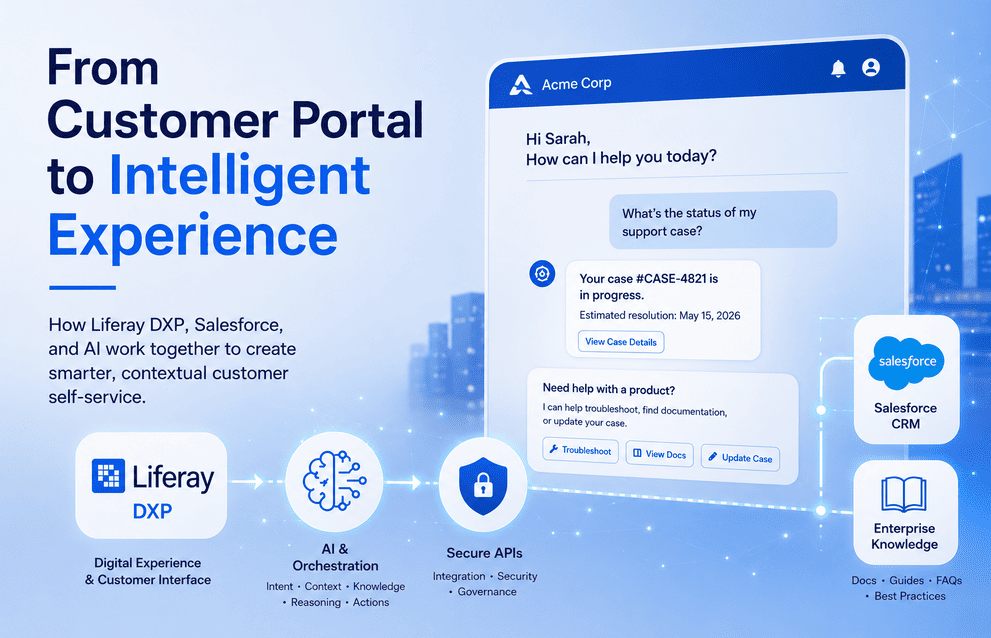
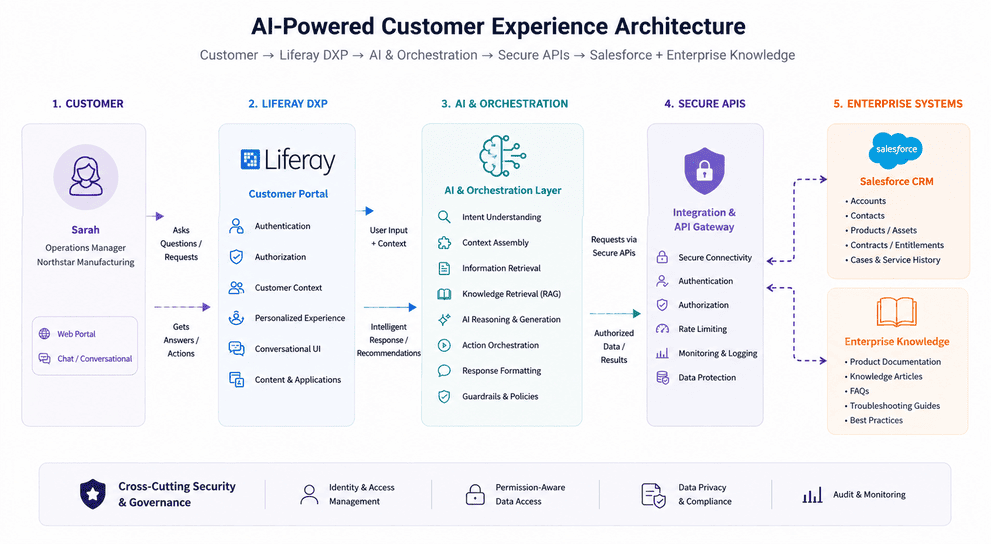
Liferay DXP provided the experience layer. It authenticated Sarah, established her customer context and permissions, and provided the digital experience through which she interacted with Acme.
Salesforce remained the customer system of record. Account information, products and services, support cases, service history, and contract information continued to live in the CRM rather than being duplicated for AI.
Enterprise knowledge provided trusted information. Product documentation, troubleshooting guides, FAQs, and knowledge articles gave the AI access to approved information beyond customer-specific CRM data.
AI provided the intelligence and orchestration layer. It understood Sarah’s questions, brought together relevant customer context and knowledge, summarized information, recommended next steps, and helped initiate an approved action.
The important point is that AI did not replace Liferay or Salesforce. Instead, it made the information and capabilities already available across these platforms easier for the customer to understand and act upon.
Liferay delivers the experience. Salesforce provides the customer context. Enterprise knowledge provides trusted information. AI connects the dots.
Liferay + Salesforce + AI Architecture
Creating this experience does not require replacing the platforms Acme already uses. Instead, the architecture connects them through clearly defined responsibilities.
At the front is Liferay DXP, which continues to provide the authenticated customer experience. It manages the portal interface, customer identity and permissions, and provides the conversational experience through which Sarah interacts with Acme.
Behind Liferay sits an AI and orchestration layer. This is where Sarah’s request is interpreted, relevant context is assembled, enterprise information is retrieved, and an AI model is used to generate a grounded response. The same layer can also determine when an approved business action needs to be initiated.
An integration and API layer provides controlled access to enterprise systems. Rather than allowing an AI model to communicate directly with Salesforce, APIs enforce how customer information is retrieved and how approved updates are performed.
Salesforce remains the system of record for customer accounts, products, contracts, entitlements, and support cases. Meanwhile, approved product documentation, troubleshooting guides, FAQs, and other enterprise content provide the knowledge needed to answer questions beyond CRM data.
Conceptually, the architecture looks like this:
This pattern is also extensible. The same orchestration layer could later connect to ERP, billing, order management, ServiceNow, SAP, or other enterprise systems without changing the customer’s primary digital experience.
The goal is not to create another system—it is to make the systems the organization already relies on work together as one intelligent customer experience.
Making AI Enterprise-Ready
Connecting AI to customer and enterprise data introduces an important question: What information should AI be allowed to access, and what actions should it be allowed to perform?
In Sarah’s case, the AI should only retrieve information that she is already authorized to access as a Northstar Manufacturing customer. It should never become a shortcut around the security and permission models protecting Liferay, Salesforce, or other enterprise systems.
This means identity and authorization must remain part of every interaction. Customer context should be permission-aware, sensitive data should be protected, and responses should be grounded in trusted sources such as Salesforce records and approved enterprise knowledge.
The same principle applies when AI moves from providing information to taking action.
There is an important progression:
Inform → Recommend → Act
An AI assistant might safely summarize a support case or recommend a troubleshooting guide. But updating a case, initiating a renewal, or triggering another business process may require additional authorization, validation, or explicit user confirmation.
Enterprise AI therefore needs more than a capable language model. It requires security, governance, guardrails, monitoring, and clearly defined boundaries around what AI can see and what it can do.
The goal is not unrestricted automation—it is trusted, controlled intelligence embedded within the customer experience.
Start Small: An AI Adoption Path
An intelligent customer experience like Sarah’s does not need to be built all at once. In fact, organizations can reduce risk and demonstrate value faster by introducing AI capabilities incrementally.
A practical adoption path could look like this:
1. Search & Answer
Start by connecting AI to approved product documentation, FAQs, and knowledge articles. Customers can ask questions conversationally while responses remain grounded in trusted enterprise content.
2. Add Customer Context
Introduce authenticated customer information from Salesforce. AI can now answer questions about support cases, products, services, contracts, and other information the customer is authorized to access.
3. Recommend Next Steps
Combine customer context with enterprise knowledge to provide more relevant recommendations—such as troubleshooting guidance, useful documentation, or suggested next actions.
4. Enable Controlled Actions
Once the appropriate security and governance controls are established, allow AI to initiate approved business processes, such as updating a support case or starting a service request—with confirmation where required.
This incremental approach allows organizations to learn, measure, and establish trust before introducing deeper automation.
The journey does not have to begin with an autonomous AI agent. It can start with one well-defined customer problem and evolve as the organization builds confidence, governance, and measurable business value.
From Portal to Intelligent Experience
For Sarah, the technology behind the experience is largely invisible. She does not need to know where customer data is stored, which system manages support cases, or where the relevant knowledge article resides.
She simply asks a question, receives an answer based on her organization’s context, and takes the next appropriate action—all within the customer experience she already uses.
That is the real opportunity for enterprises adopting AI.
Organizations do not necessarily need to replace their existing digital platforms or build entirely new AI applications. Instead, they can connect the systems they already rely on and introduce intelligence where customers already interact with the business.
Liferay delivers the digital experience. Salesforce provides the customer context. Enterprise knowledge provides trusted information. AI connects the dots.
The result is more than an AI-enabled customer portal. It is the beginning of an intelligent, contextual, and increasingly proactive customer experience.